Getting your music onto Spotify, Apple Music, YouTube Music, and other streaming services is an important step for any independent artist who wants to reach a wider audience and earn royalties from their recordings.
However, you generally do not upload a commercial music release directly to each streaming service yourself. Independent artists typically work with a digital music distributor or aggregator that delivers their audio, artwork, metadata, and release information to multiple streaming services. Spotify and Apple Music both direct independent artists toward music distributors, while YouTube Music explains that aggregators handle the delivery of music and metadata to its services.
To show how the process works in practice, I spoke with up-and-coming Afrobeats artist Jayburn about the steps he uses to prepare and release his music.
Want to hear Jayburn’s music? Listen to his freestyle here.
How to Upload Your Music to Streaming Services and Get Paid
Step 1: Record and Prepare Your Music
The first step is to make sure your song is professionally recorded, mixed, and mastered before you submit it to a distributor.
For the final release, prepare a high-quality audio master, commonly in a lossless format such as WAV or another format accepted by your distributor.
Do not upload a low-quality MP3 simply because it is convenient. Your distributor will provide the current technical requirements for audio files, so always check those requirements before submitting your release.
You should also make sure that the final master is the exact version you want listeners to hear. Check the beginning and ending of the track, volume levels, silence, clipping, and any unwanted noise before uploading.
If other artists, producers, songwriters, or musicians contributed to the recording, make sure everyone agrees on the final version and the relevant credits and royalty arrangements.
Step 2: Prepare Your Cover Artwork
You will also need artwork for your single, EP, or album.
A square image is commonly used for digital music releases, and 3000 × 3000 pixels is a practical working size for creating high-resolution cover art. However, artwork requirements can vary between distributors and services, so check your distributor’s latest specifications before submitting.
Your cover artwork should:
- Clearly represent the release
- Be high resolution
- Use the required file format
- Follow the distributor’s artwork rules
- Avoid copyrighted images or branding you do not have permission to use
Do not use artwork that belongs to another artist or company without permission. Your distributor may reject a release if the artwork or other release assets violate its requirements.
Step 3: Choose a Digital Music Distributor
The next step is to choose a music distributor.
A distributor acts as the link between you and music streaming services. Spotify explains that distributors handle music distribution and pay streaming royalties, while Apple Music recommends independent artists work with distribution partners to submit music to Apple Music and the iTunes Store.
Popular distribution services include:
- DistroKid
- TuneCore
- Amuse
- CD Baby
- Other approved or established distributors
Before choosing a distributor, compare its current pricing, royalty terms, supported stores, release timelines, analytics, customer support, and additional services.
Do not assume that every distributor uses the same pricing or royalty model. Some charge annual or per-release fees, while others may apply commissions under certain plans or services.
For example, DistroKid currently advertises that artists keep 100% of earnings from streaming services and music stores under its standard distribution model, while Amuse’s current plans have different royalty and commission terms depending on the subscription and service involved. Always check the distributor’s current terms before signing up.
Step 4: Create Your Release and Add Your Music Details
Once you have selected a distributor, create your release and upload the required files.
This is where accurate metadata becomes extremely important.
Depending on the release, you may need to provide information such as:
- Artist name
- Song title
- Album or EP title
- Featuring artists
- Genre
- Language
- Songwriter and composer information
- Producer and other credits
- Release date
- Copyright information
- Explicit-content information
- Lyrics or other optional information
Double-check every field before submitting the release.
Your artist name and song title should be consistent across your release assets and artist profiles. Incorrect metadata can create problems with artist matching, credits, reporting, and release management.
Digital distributors also format and deliver metadata to streaming platforms as part of the distribution process. YouTube explains that aggregators help prepare metadata according to industry standards and deliver the required information to its music services.
Step 5: Choose a Release Date and Submit Your Music
After entering the release details, choose when you want your song to become available.
Do not wait until the last possible moment to submit a release. Give your distributor enough time to process the music and deliver it to the stores you selected.
Your distributor may have its own processing timeline, and requirements can vary depending on the platform, territory, type of release, or corrections that may be required.
Submitting early also gives you more time to solve potential problems with your audio, artwork, metadata, or artist profile.
Once the release has been approved and delivered, keep an eye on your distributor dashboard for the status of your release.
Step 6: Promote Your Music Before and After Release Day
Uploading your music is only one part of a successful release strategy.
Start building interest before the release date. You can promote your upcoming song through Instagram Reels, TikTok, YouTube Shorts, Facebook, email, your website, and other channels where your audience is active.
Some useful promotional ideas include:
- Short teaser videos
- Behind-the-scenes clips
- Studio footage
- Lyrics previews
- Countdown posts
- Cover-art reveals
- Artist interviews
- Short performance videos
- Pre-save or smart-link campaigns
Make your promotion specific to the song instead of simply posting “My new song is out.”
For example:
“My new Afrobeats single drops Friday. Here’s the story behind the chorus.”
This gives people a reason to pay attention before the release arrives.
Apple Music for Artists also provides promotional tools that allow artists to create marketing assets and share links that direct listeners to music on Apple Music and other music services.
Step 7: Share Your Music Everywhere and Track Your Results
When your release is live, share the official links with your audience.
Your song may become available on services such as:
- Spotify
- Apple Music
- YouTube Music
- Amazon Music
- Deezer
- TIDAL
- Other stores and streaming services supported by your distributor
Instead of posting a long list of separate URLs every time, you can use a smart link that gives listeners access to multiple streaming services from one page.
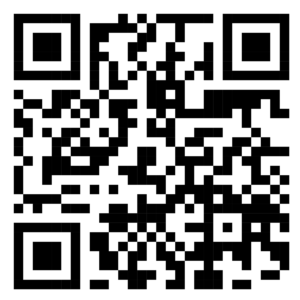
You can also create a QR code that sends fans directly to your smart-link page.
For example, Phroenix Media can use a Linkfly or similar smart-link page when promoting an artist’s release:
Listen to the song on your preferred streaming service.
Then track how your audience responds to the release. Monitor available data such as streams, listeners, playlists, territories, engagement, and overall performance.
Remember that streaming royalties do not usually appear instantly. Distributors receive reporting from streaming services and then process those earnings for artists. The timing varies by service and distributor. DistroKid, for example, explains that stores typically provide reports on a delayed basis and that the distributor passes through the earnings it receives.
How Do Music Streaming Royalties Work?
Getting your music onto streaming services and getting paid are related but separate parts of the process.
A distributor collects streaming revenue reported by stores and services and then pays the artist according to the distributor’s terms.
The amount earned per stream is not a single fixed rate. It can vary based on factors such as the service, subscription type, territory, total revenue, and the service’s royalty calculation method.
That is why you should avoid statements such as “Spotify pays exactly X amount per stream” as a universal rule.
Before choosing a distributor, carefully check:
- Subscription fees
- Distribution fees
- Commission rates
- Royalty policies
- YouTube Content ID terms
- Withdrawal fees
- Additional services
- What happens if you cancel your subscription
Some distributors advertise 100% royalty payouts under certain plans, while others may use commissions for specific services or account types. Terms can change, so always check the distributor’s current pricing and royalty information before releasing music.
Important: Protect Your Music Rights
Before you upload music to streaming services, make sure you have the necessary rights and permissions for every part of the release.
This includes the sound recording as well as the underlying composition.
If a producer, songwriter, featured artist, or another contributor is involved, agree on ownership and royalty splits before release.
Apple Music for Artists explains that a recording and its underlying composition involve different rights, and that publishing and mechanical royalties may be handled separately from the distribution of the sound recording.
For example, distributing your master recording through a digital distributor does not automatically mean that every publishing or songwriter royalty has been registered and collected on your behalf.
Keep written records of agreements, credits, ownership, and royalty splits for every release.
Can You Upload Music Directly to YouTube Music?
There is an important distinction here.
You can personally upload music files to your own private YouTube Music library for personal listening, but that does not publish your commercial release for other listeners.
For an official music release to appear on YouTube Music and related YouTube music products, you generally need to work through a music distributor or aggregator that delivers the audio and metadata to YouTube.
This is why using a distributor is an important part of learning how to upload music to streaming services.
Final Thoughts
Learning how to upload music to streaming services is easier when you break the process into clear steps.
Prepare a high-quality master, create compliant artwork, choose a suitable distributor, enter accurate metadata, select your release date, promote your music, and monitor your results after release.
Most importantly, make sure you understand your music rights and the distributor’s current royalty and pricing terms before submitting your release.
For independent artists like Jayburn, digital music distribution can provide a practical way to put music in front of listeners around the world without needing to sign directly with every streaming service.
Phroenix Media helps creators and artists strengthen their digital presence through content, social media, and online marketing strategies. A well-planned release can help turn a new song into a long-term opportunity to grow an audience.
For example, you can use a linkfly URL like this: https://linkfly.to/40105FldJKn
Or Scan this QR Code